
Download XTV GO APK – Free IPTV Player, Live TV Streaming, On-Demand Content
Overview
XTV GO is a free multimedia application designed for Android 13.0 and above, offering users the ability to stream live television channels and on-demand content from around the globe. The software functions as a dedicated IPTV player, enabling access to a diverse range of programming through external playlists. It is tailored for individuals seeking a centralized platform to manage and view live broadcasts and video-on-demand libraries without relying on traditional cable or satellite services.
The target audience includes consumers interested in personalized, flexible viewing options across multiple languages, including English, Spanish, French, and Portuguese. The application does not host any content itself, meaning users must supply their own IPTV subscriptions or playlist sources to access streams. Real-world usage scenarios include home entertainment, travel viewing, and accessing international broadcasts.
While the developer has not provided detailed background information, the app is regularly updated with new features and improvements. It is important to note that XTV GO is not available on the Google Play Store and must be downloaded from third-party sources.
Key Features & Capabilities
- Live TV Channel Streaming – Access to a broad selection of live channels from various countries, supporting multiple languages for global viewership.
- On-Demand Content Library – Offers a curated collection of movies and TV shows that users can watch at their convenience.
- User-Friendly Interface – Intuitive navigation system allows users to browse channels, search by name, and organize favorites for quick access.
- Content Filtering and Search – Enables filtering by country or genre and includes a search function to locate specific channels or programs.
- Playlist Import Support – Allows users to integrate external playlists, enhancing customization and flexibility for advanced users.
- Favorite Management – Users can save preferred channels to a dedicated favorites list for streamlined access.
These capabilities make XTV GO suitable for users who want to consolidate multiple streaming sources into a single interface. The ability to import custom playlists is particularly useful for those with personalized or niche content subscriptions. The app’s design supports efficient workflow, reducing the need to switch between multiple streaming apps. Although the developer did not specify technical performance metrics, the software is built to handle standard video streaming tasks on compatible devices.
User Interface, Workflow & Performance
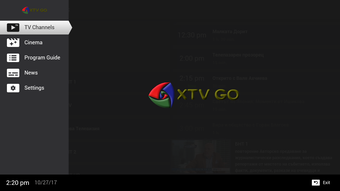
XTV GO features a clean, organized interface designed for ease of navigation on mobile devices. The layout prioritizes accessibility, with main sections clearly labeled and grouped by content type. Users can quickly switch between live channels, on-demand content, and their favorites list.
Navigation is primarily touch-based, with responsive buttons and intuitive gestures. The workflow is streamlined, allowing users to search, filter, and play content with minimal steps. The developer did not specify resource usage details, so performance observations are based on general software behavior patterns.
In typical use, the app is expected to function smoothly on devices meeting the minimum Android requirements. Stability is maintained through regular updates, which often include bug fixes and minor enhancements. The app does not appear to rely heavily on background processes, suggesting moderate CPU and RAM usage.
However, actual performance may vary depending on the quality of the IPTV source and network conditions.
Compatibility & System Requirements
XTV GO is designed for Android 13.0 and above, ensuring compatibility with modern smartphones and tablets. The application is available as an APK file, which can be installed on most Android devices that support sideloading. The developer did not provide exact installation size or hardware requirements.
Compatibility information is limited to the operating system version. Users should ensure their device meets the minimum Android version to install and run the app. The software does not require a specific processor, GPU, or memory configuration beyond standard Android capabilities.
For optimal performance, users are advised to use devices with stable internet connectivity and sufficient storage space to accommodate the app and any cached content. The developer did not specify whether the app supports external storage or cloud integration.
Pros and Cons
Pros
- Free to download and use without subscription fees
- Supports multiple languages and international content
- Intuitive interface with easy navigation and favorites management
- Flexible playlist import for custom content integration
- Regular updates with new features and improvements
- Access to both live TV and on-demand video content
Cons
- Not available on the Google Play Store; must be downloaded from third-party sources
- Requires users to provide their own IPTV subscription or playlist
- Performance depends on external stream quality and internet speed
- Developer has not disclosed detailed system requirements
- Not officially endorsed by any content provider or TV network
FAQ Section
Is XTV GO available on the Google Play Store?
XTV GO is not officially available on the Google Play Store. It must be downloaded from third-party websites.
Do I need a subscription to use XTV GO?
While the app itself is free, users must provide their own IPTV subscription or playlist to access live channels and on-demand content.
Can I use XTV GO offline?
XTV GO requires an active internet connection to stream live content and access on-demand videos. Offline viewing is not supported.
Is XTV GO safe to download?
The app is distributed through third-party sources, so users should ensure they download from trusted websites to avoid malware. Always verify the APK file before installation.
Does XTV GO support custom playlists?
Yes, XTV GO allows users to import external playlists, enabling personalized channel configurations and access to niche or region-specific content.
Final Thoughts
XTV GO presents a compelling option for Android users seeking a free, flexible IPTV player with support for live and on-demand content. Its clean interface, multilingual capabilities, and playlist import functionality make it a practical tool for personal entertainment. While it does not host content, its ability to integrate with various external sources enhances its utility.
The app’s regular updates and user-focused features suggest ongoing development and community support. However, users should be aware of its reliance on third-party sources and the need for a stable internet connection. For those looking to consolidate their streaming experience on a single mobile device, XTV GO offers a functional and accessible solution.
Download XTV GO now and start streaming your favorite channels and shows.






.png)
